Geophysical Intelligence System

Clean systems for geophysical decisions.

Terracode builds the data automation and predictive modelling layer that lets technical teams execute faster — and lets stakeholders see project outcomes clearly.

14GAIA Methods
6Lifecycle Stages
3Subscription Tiers
System Index — 02 ProductsLive
14
GAIA Processing Methods
6
Project Lifecycle Stages
3
Subscription Tiers
[ 01 ]The Terracode System

Two products, one operating system

GAIA handles geophysical processing with method-level precision. G-Orchestrate wraps the full project lifecycle — from planning through delivery.

Processing Engine · Technical teams

GAIA

Unified processing engine for geophysical analysis with a method-based execution model.

  • Structured processing pipeline
  • Method-by-method controlled rollout
  • Aurora AI reports and predictive modelling
See GAIA methods and plans
Enterprise Platform · Organizations

G-Orchestrate

Workflow orchestration layer giving organizations full project visibility from pre-field through delivery.

  • Operational transparency across teams
  • Lifecycle-aware project coordination
  • Enterprise inquiry and solution design
Request enterprise inquiry
[ 02 ]Services

Expert support alongside the platform

When teams need geophysical execution support or custom tooling, Terracode provides both — built on the same workflow logic as GAIA and G-Orchestrate.

SVC / 01

Geophysical services

Data acquisition, processing, interpretation, and full lifecycle delivery support.

SVC / 02

Custom application building

Workflow systems, geophysical tools, and integrations tailored to your operating environment.

Tell us your current operational bottleneck and we will map the right path.

Start now

Ready to bring structure to your geophysical operations?

GAIA is live with Magnetics. G-Orchestrate enterprise discussions are open. Services available on inquiry.

GAIA · Unified Engine

One engine, multiple geophysical methods

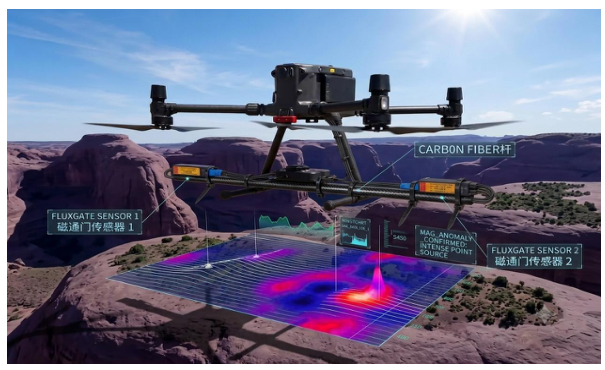
GAIA is the unified execution layer for geophysical processing methods. Magnetics is live now. The full method stack rolls out in controlled stages.

[ 01 ]Method Index

Magnetics is live. Full stack follows.

GAIA method availability is gated by production readiness. Magnetics is the first live method; all others are in controlled coming-soon rollout.

[ 02 ]GAIA Outcome

What GAIA enables for teams

GAIA helps teams move from fragmented processing to a structured method workflow — consistent outputs, clearer interpretation, reliable handoff into reporting.

OUT / 01

Method consistency

Every method follows controlled processing steps so technical results remain reproducible and auditable.

OUT / 02

Decision readiness

Outputs are generated in a format that supports faster technical review and cleaner transition into reports.

For plan selection and feature comparison, see the pricing page.

Pricing

Choose a GAIA subscription tier

Lite, Pro, and Premium — clearly compared. Predictive modelling remains in development across all plans.

Lite
$10 / mo

Core processing for individuals entering structured geophysical workflows.

  • IGRF correction
  • Basic filtering
  • Regional/residual separation
  • Preview and visualisation
  • Project creation and upload
Most popular
Pro
$50 / mo

Extended derivative operations for professional delivery workflows.

  • Everything in Lite
  • Full filtering control
  • First vertical derivative
  • Horizontal derivative
  • Multi-line processing
Premium
$150 / mo

Advanced derivatives with Aurora AI reports and predictive modelling direction.

  • Everything in Pro
  • Second vertical derivative
  • Total horizontal gradient
  • Tilt derivative
  • Analytic signal + Aurora reports
Enterprise System

Geophysical operations, structured and fully visible

G-Orchestrate connects planning, field operations, processing, and reporting into one system — giving teams and clients full visibility across every project stage.

[ 01 ]The Problem

Why teams struggle without orchestration

Disconnected workflows create execution gaps. Managers can't see real-time status. Projects run on manual follow-up instead of structured process.

PRB / 01

Fragmented workflows

Pre-field, processing, and reporting are disconnected — creating execution gaps at every handoff.

PRB / 02

No visibility

Managers and clients can't see complete real-time project status, leading to late discovery of delays.

PRB / 03

Manual coordination

Project momentum depends on constant human follow-up instead of structured process flow.

[ 02 ]How It Works

One system across the full project lifecycle

Six stages, one connected operating system — from first planning to client delivery.

01
Pre-field
02
Field ops
03
Processing
04
Interpretation
05
Reporting
06
Client delivery
[ 03 ]Core Capabilities

Workflow, visibility, automation

CAP / 01

Workflow orchestration

Tasks and phases connected in a defined sequence that drives execution, not just documentation.

CAP / 02

Real-time tracking

Internal teams and leadership view project state continuously, eliminating blind spots.

CAP / 03

Data and output management

Processing outputs and reports tracked and linked to each project stage.

CAP / 04

GAIA integration

Processing runs through GAIA as part of one connected operating system — not isolated tools.

[ 04 ]Transparency

Internal alignment and external trust

TRN / 01

Internal

Teams stay aligned, managers stay informed, decisions happen faster with fewer surprises.

TRN / 02

External

Clients access progress and deliverables directly — reducing communication friction at every stage.

Request an enterprise discussion to map G-Orchestrate to your operating environment.

Services

Geophysical expertise and custom systems

Terracode supports organizations with geophysical services and custom-built systems — ensuring workflows are structured from data acquisition through delivery.

[ 01 ]Why Services

An extension of the platform, not a separate business

Services give organizations an entry path when not yet ready for full software adoption — built on the same structured workflow logic that powers GAIA and G-Orchestrate.

[ 02 ]Geophysical Services

Execution support across project delivery

GEO / 01

Data acquisition support

Survey planning, field coordination, and acquisition workflow support.

GEO / 02

Processing and interpretation

Corrections, processing, and interpretation in structured pipelines aligned with GAIA logic.

GEO / 03

Project delivery

Lifecycle delivery from data to final report outputs.

[ 03 ]Custom Application Building

Tailored systems for operational teams

APP / 01

Workflow systems

Internal tracking, dashboards, and coordination layers for project teams.

APP / 02

Geophysical applications

Custom tools for specific geophysical processing and operational needs.

APP / 03

Integrations

Connect current systems and data streams into a cleaner execution environment.

[ 04 ]Progression Path

A path that scales with your organization

PTH / 01

Services

Real-world geophysical execution and workflow support.

PTH / 02

GAIA

Automated analysis and method-driven processing.

PTH / 03

G-Orchestrate

Enterprise lifecycle orchestration and transparency.

Tell us your current operational bottleneck and we will map the right path.

Blog

Platform notes and field thinking

Insights, product updates, and workflow thinking from the Terracode team.

No posts published yet

Field notes and platform updates will appear here.

Blog Article

Terracode article

Loading article…

Contact

Choose your inquiry path

GAIA access, G-Orchestrate enterprise discussions, services inquiry, or general questions — we'll route your message to the right person.

Send a message

Contact details

GAIA
Magnetics method live — more methods rolling out in stages.
Enterprise
G-Orchestrate enterprise inquiries open now.
Services
Geophysical and custom development inquiries welcome.
Developer Portal

Build with Terracode processing APIs

Generate real API keys for controlled access to G-MAG and Quest processing workflows, with quotas, usage tracking, legal acceptance, and mailing list subscription built in.

[ 01 ]API Products

Two engines behind one developer key system

G-MAG / Magnetics

Correction and interpretation workflow

Diurnal correction, IGRF removal, regional/residual separation, residual anomaly zone picking, half-width depth calculation, job submission, status polling, and usage tracking.

Quest / Processing engine

Magnetic, radiometric, terrain, and GIS generation

Gridding, TMI, RTP/RTE, FVD, THG, analytic signal, tilt derivative, Euler outputs, K/eU/eTh and ternary, terrain products, and GIS generators through scoped jobs.

Developer Portal / G-MAG

G-MAG developer API

Expose the production G-MAG magnetic correction and interpretation workflow through scoped developer jobs.

GMAG / 01

Diurnal correction

Apply diurnal magnetic variation correction in the active G-MAG pipeline.

GMAG / 02

IGRF removal

Remove the International Geomagnetic Reference Field contribution.

GMAG / 03

Regional/residual separation

Generate regional and residual magnetic fields from corrected data.

GMAG / 04

Residual anomaly zones

Pick residual anomaly zones for interpretation and review.

GMAG / 05

Half-width depth

Estimate approximate source depth using half-width profile geometry.

API operation ids: diurnal_correction, igrf_removal, regional_residual_separation, residual_anomaly_zones, half_width_depth.

Developer Portal / Quest

Quest developer API

Generate magnetic, radiometric, terrain, and GIS products through the Quest processing engine.

MAG / 01

Magnetic products

Gridding, TMI, RTP, RTE, FVD, THG, analytic signal, tilt derivative, Euler solutions, clusters, rejected solutions, and targets.

RAD / 02

Radiometry

K, eU, eTh single-band generation and ternary RGB composite generation.

TER / 03

Terrain

DEM, hillshade, multi-hillshade, slope, contours, drainage network, drainage density, lineaments, density, and intersections.

GIS / 04

GIS analysis

Vector overlays, raster calculator/reclassify/clip/mosaic, interpolation, terrain profiles, hotspot and suitability analysis.

Quest keys are scoped through the Terracode gateway, so raw internal Quest routes are not exposed publicly.

Developer Portal

Terracode Console

Sign in to access your developer workspace.

Developer sign in

Sign in or create an account to open your Terracode developer console.

or

Terracode Analytics
TA
Developer Portal launch gate

API key generation and developer API calls open automatically on launch.

Good day

Overview of your developer account and activity.

Total Projects0
API Requests0
Successful Jobs0
Avg. Processing Time-
T

Projects

Your generated API keys are grouped as projects.

Request API key

Subscription and legal acceptance are confirmed during sign-up.

Recent Activity

Recent API job activity across your account.

Analytics

Usage totals for this developer account.

0Total API Requests
0Total Errors

Products

Explore Terracode developer products available through the gateway.

G-MAG Products

Magnetic correction and interpretation workflow.

Quest Products

Magnetic, radiometric, terrain, and GIS product generation.

API Keys

Manage keys used to authenticate Terracode developer API requests.

Total Keys0
K
Active Keys0
A
Revoked Keys0
R
Expiring Soon0
E

Keys

Keys are shown once when created, then stored hashed.

API Key Best Practices

  • Store API keys securely.
  • Never share keys in public repositories.
  • Use environment variables.
  • Revoke unused keys.

Analytics

Track API usage, job activity, and error trends for this account.

Total API Requests0
Q
Successful Jobs0
J
Total Errors0
X
Data Processed-
D

Requests by Product

Usage will populate as your keys submit work.

Recent Alerts

A
No alerts yetOperational alerts will appear here when there is activity to review.
Admin Access

Admin publishing access

Admins can publish blog posts with images, SEO fields, and generative-engine metadata.

Admin sign in

Superadmin Access

Secure control for Terracode operations

The superadmin workspace manages admin invites, blog publishing, and payment-bypass app links.

Superadmin setup

Request a one-time setup link by email if the superadmin account is not yet initialized.

Complete setup

Superadmin sign in

Admin Workspace

Publish Terracode blog content

Signed in user: none

Loading workspace…

New blog post

Create rich posts with image upload, SEO metadata, and GEO fields.

Editing

Published posts

Review and manage existing posts.

Superadmin Workspace

Admin invites, publishing, bypass controls

Signed in user: none

Loading workspace…

Publish blog post

Superadmin posts use the same SEO, GEO, and image workflow.

Editing

Invite an admin

Generate a one-time email invite for a new admin account.

Payment-bypass link

Create an expiring access link for a product and customer email.

Developer API keys

Review developer keys, scopes, usage, and revoke access.

Published posts

Edit, delete, or open any published article.

Legal

Terms of Service

Legal

Privacy Policy

Legal

Cookie Policy

Legal

Acceptable Use Policy

Legal

Data Ownership and Confidentiality

Legal

AI and Third-Party Processing

Legal

Disclaimer and Limitation of Liability